

RIDE and email
Once the SRI authorizes a document, Flashpi delivers it: it renders the RIDE and, when asked, emails it with the XML to the buyer. Delivery has its own statuses, separate from the tax status: a RIDE or an email that fails never changes whether the SRI authorized the document. See Document lifecycle. Email delivery is still being enabled: until then, you deliver the RIDE and the XML yourself (see The email to the buyer).
The RIDE
Section titled “The RIDE”The RIDE (Representación Impresa del Documento Electrónico) is the printable version of an authorized document: a PDF/A-2b file with every field the SRI’s Annex 2 requires and the access key as a Code 128 barcode.
- Flashpi renders it right after the authorization, usually within seconds. Only authorized documents get a RIDE.
GET /v1/documents/{id}/pdfreturns it onceride.statusisgenerated(Content-Type: application/pdf, named after the access key). Before, or if it failed, the answer is409ride_not_availablewith the currentrideStatus.- The
document.ride.generatedanddocument.ride.failedwebhooks tell you when it is ready, or that it could not be rendered. - Test documents carry the notice “Documento emitido en el ambiente de pruebas del SRI: no tiene validez tributaria.”
curl https://api.flashpi.com.ec/v1/documents/01a1412b-ae38-7c39-8c71-16d2b5dfc472/pdf \ -H "Authorization: Bearer $FLASHPI_API_KEY" \ -o factura-001-001-000000123.pdfThree templates
Section titled “Three templates”Every account uses one of three base templates, all following Annex 2. The default is modern; an account owner chooses another one in the console, under Settings, Account.
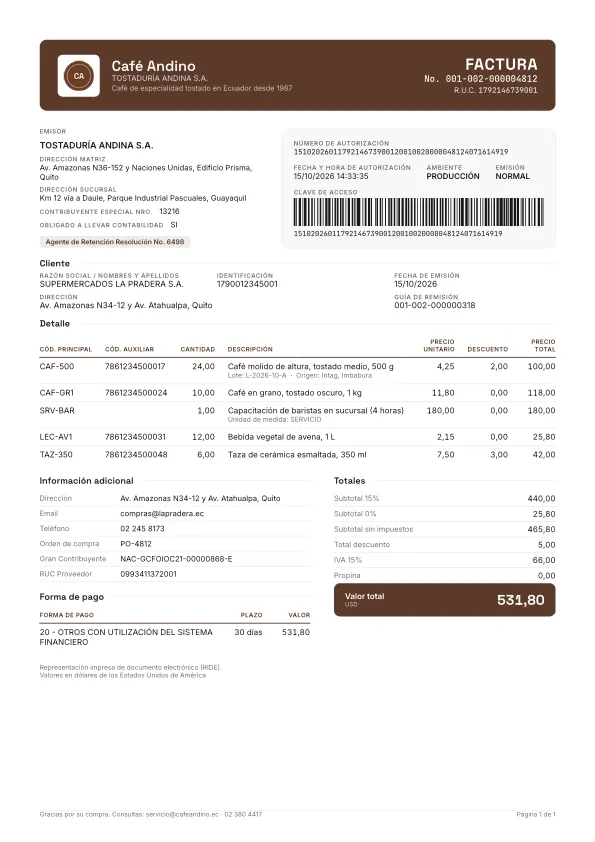
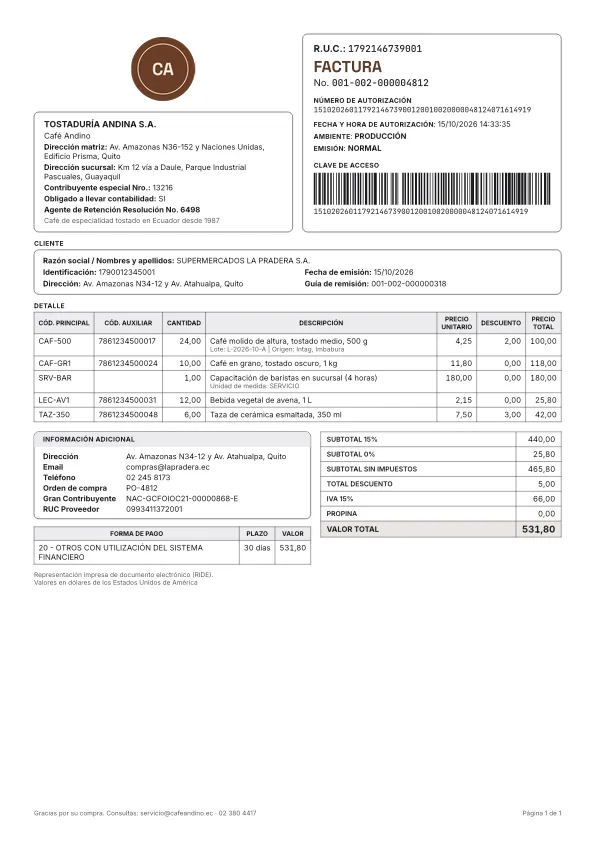
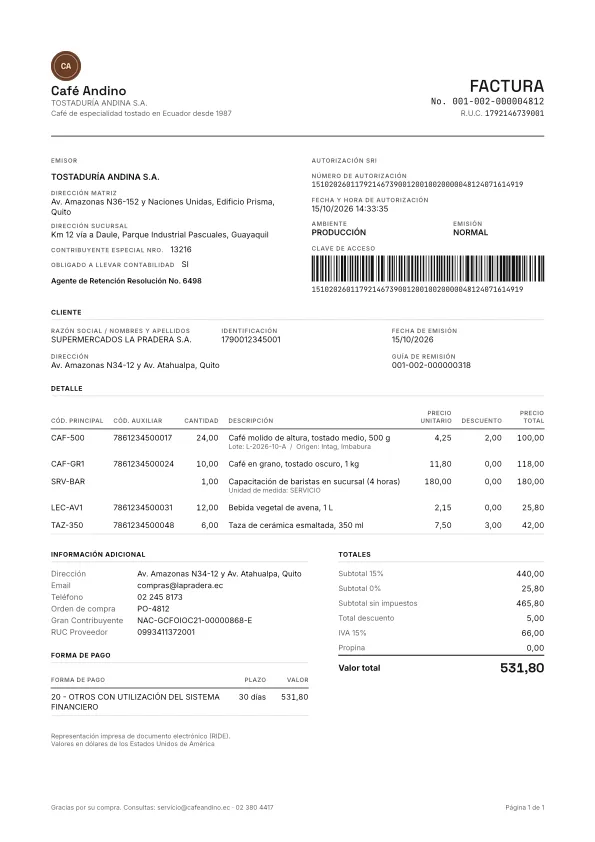
The previews use sample data. Today an issuer’s branding is its brand color (branding.brandColor, see Issuers); the logo and the notes shown in the samples cannot be configured yet.
- A document is rendered once, in the template the account has at that moment. Changing the template applies to the RIDEs rendered afterwards, not to the ones already generated.
ride.templatesays which template a RIDE used.- A RIDE that failed is rendered again when you email the document again (see below). Asking for a new RIDE of a document otherwise is not possible yet.
The email to the buyer
Section titled “The email to the buyer”When a document is authorized, Flashpi emails its RIDE (PDF) and its authorized XML to the email address of the request:
| Document | Address used |
|---|---|
| Invoice, credit note, debit note | customer.email |
| Purchase settlement | supplier.email |
| Withholding receipt | subject.email |
| Waybill | None: a waybill is never emailed |
The email goes out only when all three hold: the document is authorized, the email was requested, and there is an address. On a test document, the address must also belong to a member of your team (see Test document recipients).
- Requested:
options.sendEmailin the request decides for that document,trueorfalse. Without it, the issuer’ssendEmailByDefaultapplies (trueunless you turned it off on the issuer). - The document’s
email.requested,email.statusandemail.deliveries[]show what happened:not_requestedwhen it was opted out,skippedwithout an address,queueduntil it is sent, thensent,delivered,bounced,complainedorfailed. - Each change raises a webhook:
document.email.sent,document.email.delivered,document.email.bounced,document.email.complainedanddocument.email.failed.
What the buyer receives:
- From
comprobantes@flashpi.com.ec, with the issuer’s trade name (or legal name) as the sender’s name. - In Spanish, with the issuer’s brand color: the document type, number, date, total and access key, with the RIDE and the XML attached (
factura-001-001-000000123.pdfandfactura-001-001-000000123.xml). - The subject is the document and the issuer, for example
Factura 001-001-000000123 de Café Andino. Test documents add[PRUEBAS]at the start of the subject and a notice in the body.
Address checks
Section titled “Address checks”Flashpi checks the recipient’s address so that a mistyped email does not bounce:
- Typos. When the address’s domain looks like a typo of a common mail domain (for example gmial.com for gmail.com), the document’s
email.warnings[]holds arecipient_domain_typowarning with amessageand the suggested address (suggestedRecipient). It is only a warning: the email still goes to the address as given. Fix it in your system for the next documents; the address of an issued document cannot be changed yet.email.warningsis empty when nothing looks wrong. - Domains that receive no mail. Right before each send, Flashpi checks that the recipient’s domain exists and receives mail (an MX record or, without one, an A or AAAA record). If it does not, the email is not sent: its delivery is
failedwith the errorinvalid_domain, anddocument.email.failedis raised. - Suppressed addresses. An address that bounced or marked an email as spam before can be on the suppression list of Flashpi’s email provider, which no longer sends to it: the delivery is
bouncedwith the errorbounce_suppressed.
Test document recipients
Section titled “Test document recipients”Anyone can issue test documents with made-up buyers, so their emails only go to the addresses of console users who verified them and are members of the account that issued the document (also with the shared demo issuer). To try the email, use your own address as the customer’s email.
- Any other address is not emailed and does not count against the daily limits: its delivery is
failedwith the errortest_recipient_not_allowed, anddocument.email.failedis raised. POST /v1/documents/{id}/emailanswers409test_recipient_not_allowed.- Flashpi checks the address again right before sending, so an email queued for someone who left the team fails the same way.
- Live documents are not restricted.
Emailing a document again
Section titled “Emailing a document again”POST /v1/documents/{id}/email sends an authorized document’s email again, to the same address, for example after the buyer lost it or after a bounce was fixed on their side. It needs a read_write key, and works even when the email was not requested at issue time. Send no body, or an empty object.
curl -X POST https://api.flashpi.com.ec/v1/documents/01a1412b-ae38-7c39-8c71-16d2b5dfc472/email \ -H "Authorization: Bearer $FLASHPI_API_KEY"The answer is 202 Accepted with the document: a new entry in email.deliveries and email.status queued. If its RIDE had failed, it is rendered again first.
| Answer | When |
|---|---|
409 document_not_authorized |
Only authorized documents are emailed. The body carries the documentStatus. |
409 email_recipient_missing |
The request had no email address. Sending to another address is not possible yet. |
409 email_already_queued |
An email of the document is still waiting to be sent. Try again once it was sent or failed. |
409 email_sending_paused |
The account’s document emails are paused in the document’s environment, see Paused emails. The body carries the environment. |
409 test_recipient_not_allowed |
The document is a test one and its address is not a verified member of the account’s team, see Test document recipients. |
429 email_resend_limit_reached, account_email_limit_reached, platform_email_limit_reached |
A daily limit was reached, see below. |
Daily limits
Section titled “Daily limits”To protect the reputation of the sending domain, and your customers’ inboxes, buyer emails have daily limits:
| Limit | Test documents | Live documents |
|---|---|---|
Resends of one document (POST .../email) |
3 a day | 10 a day |
| Emails per account: automatic emails and resends together | 20 a day | 200 a day |
The document emails of every Flashpi account also share one daily limit, test and live, automatic emails and resends together (platform_email_limit_reached). Its figure is not published.
- Days follow the calendar in Ecuador (UTC-5): the counts start again at midnight in Ecuador.
- The live per-account limits are defaults; Flashpi can set different ones for an account.
- A resend beyond a limit gets
429withRetry-AfterandresetsAt. The document and account limits also carry thelimit; the platform’s does not show its figure. - An automatic email beyond the account’s or the platform’s limit is not sent: its delivery is
failedwith the erroraccount_email_limit_reachedorplatform_email_limit_reached, anddocument.email.failedis raised. Email it again once the limit resets.
{ "type": "https://flashpi.com.ec/docs/en/errors/email_resend_limit_reached", "title": "Resend limit reached", "status": 429, "detail": "This document's email was already resent 3 times today. You can resend it again after 2026-10-16T05:00:00.000Z.", "instance": "/v1/documents/01a1412b-ae38-7c39-8c71-16d2b5dfc472/email", "code": "email_resend_limit_reached", "errors": [], "requestId": "01a14190-6c2e-7f41-8a07-3d9b2e5c1f68", "limit": 3, "resetsAt": "2026-10-16T05:00:00.000Z"}Paused emails
Section titled “Paused emails”Every Flashpi customer’s document emails go out through the same email provider account, whose reputation depends on few emails bouncing or being marked as spam. To protect it, Flashpi pauses an account’s document emails when, in the last 7 days:
- at least 3 emails bounced permanently (
bounce_permanent: the address or the domain does not exist) and they are at least 3 % of the emails sent, or - at least 2 emails were marked as spam and they are at least 0.05 % of the emails sent.
Each environment is measured and paused on its own: test emails only pause test emails, and live emails only live ones. Only permanent bounces count: transient or undetermined bounces, bounce_suppressed and invalid_domain (which is never sent) do not.
While the emails are paused:
- Documents are still issued and authorized, and their RIDE is rendered.
- Their emails are not sent: each delivery is
failedwith the erroremail_sending_paused, anddocument.email.failedis raised. They do not count against the daily limits. POST /v1/documents/{id}/emailanswers409email_sending_paused, with the pausedenvironment.
Flashpi tells you: the account’s owners get an email, the console shows a notice above every page, and the account.email_paused webhook is raised. Flashpi’s team can also pause an account’s emails by hand, with the same notices.
Only Flashpi’s support can resume them: check the addresses of the documents whose emails bounced and write to soporte@flashpi.com.ec. When they are resumed, account.email_resumed is raised and the 7 days count again from that moment. The emails that failed during the pause are not sent on their own: email those documents again with POST /v1/documents/{id}/email.